
A fan is one of the most versatile appliances for keeping your living room or bedroom comfortable, whether you need quiet airflow for sleep or powerful wind to cool a busy garage. From pedestal fans with remote control features to ceiling fans that boost efficiency and style, today’s fan variations offer smart solutions for every space. In this guide, you’ll discover how different fan types, features, and energy-saving tips can enhance comfort, improve air circulation, and help you choose the ideal fan based on your unique needs.
Featured Products
Best Overall • Best Value • Premium Option


Note: As an Amazon Associate I earn from qualifying purchases. Some of the links on this site are affiliate links — when you buy through those links, I may earn a small commission at no extra cost to you.
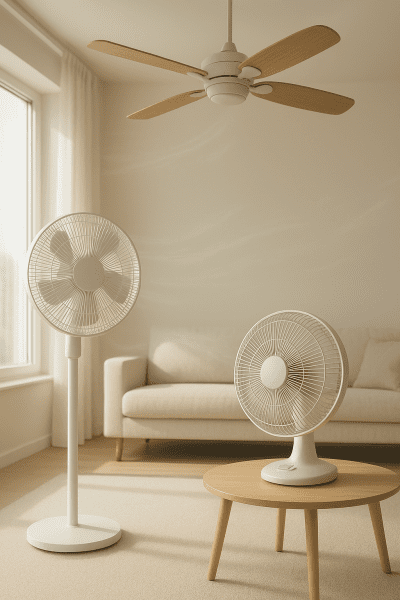
Understanding Airflow, CFM, Blades, and Fan Efficiency
Airflow is how much air a fan moves, measured in CFM. The number of blades, their shape, and size affect performance. Efficient fans use less watts but deliver strong airflow. Many ceiling fans, pedestal fans, and box fans are designed for specific room sizes.
Choosing a fan for your bedroom or living room depends on airflow and speed. More blades can mean quieter operation but sometimes less air movement. Pedestal fan options often offer adjustable height and oscillation. Next, explore key airflow metrics and blade design differences for better buying decisions.
Key airflow metrics and blade design differences
- CFM ratings show how much airflow a fan can deliver in a specific space like a bedroom or garage.
- Fewer blades often create higher velocity wind, while more can lower noise and provide a fancy appearance.
- Oscillation and adjustable angle let a pedestal or desk fan distribute air evenly across a living room or workshop.
- Blade length and pitch directly affect cooling fan efficiency, especially in ceiling fans and portable desk models.
Comparing Ceiling, Pedestal, and Oscillating Fan Features
Ceiling, pedestal, and oscillating fans each offer unique ways to cool a room. These fan variations differ in design, placement, and airflow. Choosing the right style impacts comfort in your bedroom, garage, or living room.
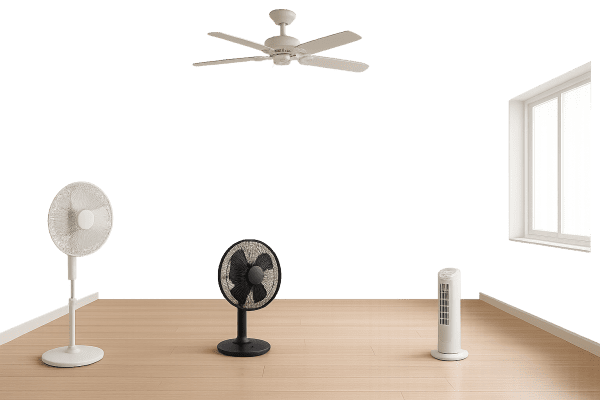
Ceiling fans mount above and circulate air across a wide space. Pedestal fans are portable and often have adjustable height and speed. Oscillating fans sweep air side to side for even coverage. To find the best fit, consider the main advantages and drawbacks of each style.
Main advantages and drawbacks of each style
- Ceiling fans create steady airflow and reduce heat but require installation and enough ceiling height in a room.
- Pedestal fans are portable and lightweight for quick fanout but can be noisy at high speed in a dorm or garage.
- Oscillating fans distribute wind widely and offer timer features, yet may take up desk or floor space and need regular cleaning.
- Each fan variation fits different spaces, so choosing the right option affects comfort and energy use in your bedroom, living room, or workshop.
Room Size, Height, and Fan Placement Strategies
Choosing the right fan for your space depends on room size, ceiling height, and placement. A ceiling fan works best in living rooms with high ceilings. Pedestal and oscillating fans suit bedrooms, garages, or dorms where flexible positioning matters.
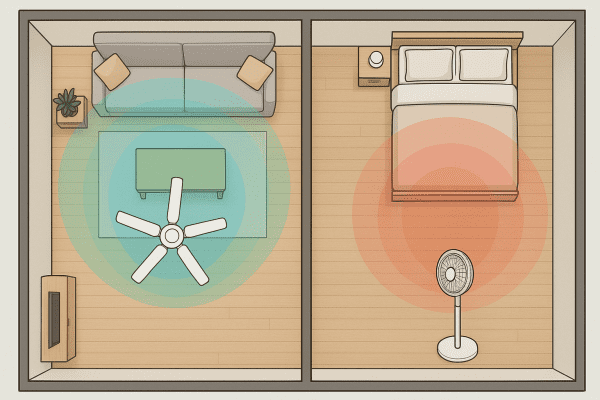
Larger rooms need fans with higher airflow, measured in CFM. Bedrooms or offices may need quieter, smaller variations like a desk or portable fan. Avoid blocking airflow with furniture or walls. For best results, review Sizing and positioning fans for optimal coverage next.
Sizing and positioning fans for optimal coverage
- Place a pedestal fan in open corners to maximize airflow around furniture and reduce dead spots in your living room.
- Hang a ceiling fan at least 7 feet above the floor for safe circulation and efficient wind distribution in taller spaces.
- Use a desk or portable fan near workstations in a garage or dorm for targeted cooling without blocking ventilation.
- Adjust oscillation angles to direct air across the entire bedroom or workshop, preventing stagnant heat buildup.
Optimizing Noise, Speed, and Remote Control Settings
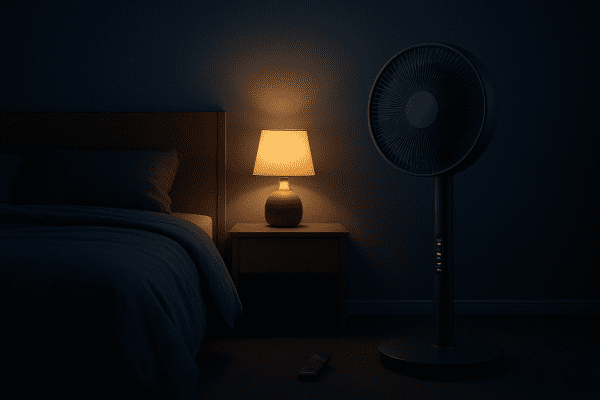
Adjusting fan speed and noise settings helps create a quiet, comfortable environment. Remote control features add convenience, letting you change airflow or timer settings from your bed or desk. These options are now common on many pedestal, oscillating, and ceiling fans.
Lower speed settings reduce noise in a bedroom or office. Higher speed gives strong wind in a garage or workshop. Use the timer to save energy while sleeping. Look for remote control fans for easy changes. Next, learn practical tips in adjusting fan output for comfort and convenience.
Adjusting fan output for comfort and convenience
- Use the remote control to fine-tune speed or oscillation without leaving your desk or bed.
- Try sleep mode or timer features on your pedestal fan to maintain a quiet environment in your bedroom overnight.
- Adjust the angle or direction on oscillating fans to keep airflow reaching every corner of your living room or workspace.
- Lower speed settings on your ceiling fan for reduced noise during late-night gaming or while reading fanfiction.
Cleaning Blades, Grill, and Motor for Peak Performance
Keeping your fan clean boosts airflow and extends its life. Dust on blades, the grill, or motor can reduce efficiency. Regular cleaning helps prevent noise and keeps your cooling fan working well in any room or workshop.
Use a damp cloth to wipe blades and a vacuum for the grill. Remove dust from the motor area to avoid overheating. This is important for pedestal fans, oscillating fans, and portable desk variations. For best results, follow the step-by-step cleaning and dust prevention tips.
Step-by-step cleaning and dust prevention tips
- Unplug your electric fan and detach the grill before cleaning the blades to avoid dust spreading in your bedroom or garage.
- Use a soft brush or compressed air to remove debris from the motor area and ventilation slots for optimal airflow.
- Wipe down the pedestal and oscillating fan base with a damp cloth to prevent buildup that affects speed and noise.
- Store portable desk fans in a dry space when not in use to reduce dust accumulation and maintain fan efficiency.
Managing Energy Use, Watts, and Appliance Costs
Managing the watts your fan uses helps control appliance costs. Each cooling fan or oscillating fan draws power while running. Table fans and ceiling fans vary in energy use. Knowing the electric fan’s watt rating helps you estimate monthly expenses.
A typical pedestal fan uses around 40–90 watts. Running a fan in your bedroom or garage costs about $1–$5 per month. Using a timer or sleep mode reduces energy waste. Next, learn practical ways for reducing power consumption and monthly expenses.
Reducing power consumption and monthly expenses
- Select a fan with a dc motor for lower watts and quieter operation in your living room or desk area.
- Use oscillation and timer features to cool only occupied space and minimize unnecessary appliance costs.
- Switch off ceiling fans and portable desk fans when leaving the room to avoid wasted energy.
- Keep blades and grill clean to maintain airflow and reduce strain on the electric fan’s engine.
Enhancing Living Room Comfort with Timer and Oscillation
Timer and oscillation features help maximize comfort in your living room. An oscillating fan sweeps cool air across a wider space. The timer lets you set how long the cooling fan runs. These settings fit different needs, from relaxing to hosting a fan club gathering.
Use the timer to avoid running your pedestal fan all night. Oscillation distributes airflow evenly, making every inch of the room feel cooler. Both features reduce energy use and help manage appliance costs. For smarter control, explore Using automation features for efficient cooling next.
Using automation features for efficient cooling
- Program your smart fan to activate airflow when living room temperature exceeds a set threshold.
- Link pedestal fans with wi-fi or Alexa for hands-free, fanlike adjustments during gatherings.
- Schedule oscillating fan cycles to match peak heat hours and optimize noise levels for relaxation.
- Use app-based controls to sync timer and speed settings across multiple cooling fans in your space.
Improving Bedroom Sleep with Quiet Airflow Technology
Quiet airflow is essential for restful bedroom sleep. A low-noise fan can make a big difference. Gentle wind helps cool the space without distraction. Many prefer a fanlike hum over louder appliances. The right fan variation supports a comfortable, peaceful environment.
Look for fans with low decibel ratings and smooth airflow. Oscillating or portable desk fans often provide quiet operation. Adjustable speed lets you match noise to your needs. Features like sleep mode and remote control increase convenience. Next, learn about selecting low-noise fans for restful environments.
Selecting low-noise fans for restful environments
- Choose a pedestal fan with multiple speed settings to fine-tune noise and airflow in your bedroom.
- Opt for a desk or portable fan with a dc motor for quieter operation during sleep.
- Look for fans with sleep or night mode to minimize sound and dim any led display in your living room or dorm.
- Select oscillating fan variations with sound-dampening features for peaceful rest in shared spaces.
Ensuring Fan Safety with Stable Base and Child Protection
A stable fan base and proper child protection help prevent accidents. Wobbly pedestal fans or exposed fan blades pose risks in any room. Choose cooling fan designs with secure grills to protect hands. Safety matters for every fan variation in bedrooms, living rooms, and dorms.
Place pedestal or oscillating fans away from high-traffic zones. Use child-safe grills to block curious fingers from spinning blades. Avoid unstable fan placement on desks or workshop benches. Regularly check that the fan base stays level. Next, review essential Safety features and guidelines for family households.
Safety features and guidelines for family households
- Use a pedestal fan with a weighted fan base to prevent tipping in busy living rooms or play areas.
- Choose desk or portable desk fans with child-safe grills and no sharp metal edges to protect hands in a bedroom or dorm.
- Select an oscillating fan with secure grill locks and low-noise operation for safe use around pets and young fangirls or fanboys.
- Store handheld or battery powered fans out of reach when not in use to avoid accidental activation in family spaces.
Extending Fan Lifespan Through Regular Maintenance Routines
Regular maintenance helps any fan last longer and work better. Cleaning the fan base, blades, and grill removes dust. Simple routines prevent fanlike noise and airflow drop. These steps are important for ceiling fans, portable desk fans, and oscillating variations in any room.
Wipe the grill and check the motor on your electric fan every few months. Inspect the pedestal and tighten loose screws to avoid vibration. Check for fanned dust around vents in bedrooms or garages. Good habits now can save on repair costs. Next, see how routine checks prevent breakdowns and failures.
Routine checks to prevent breakdowns and failures
- Inspect the fan base and pedestal for loose screws or fanned cracks that could affect stability in your living room.
- Check oscillation and speed controls on your electric fan to ensure smooth operation and prevent fanlike malfunctions.
- Test remote control functions and led display settings on oscillating fans to catch early signs of failure.
- Examine ventilation slots on your cooling fan and desk models for dust buildup that could cause overheating.
Final Thoughts:
A fan remains one of the most essential and versatile appliances for creating comfort in any living room, bedroom, or workspace. By understanding key features like oscillation, fan base stability, and energy-efficient dc motors, consumers can make informed choices that fit their unique needs. Whether you’re looking for a quiet cooling fan or exploring new fan variations with smart features, regular maintenance ensures long-term performance. Ready to upgrade your comfort? Explore the latest fan options and choose the model that best suits your space and lifestyle today.
Frequently Asked Questions (FAQs)
How do I choose the right fan size and type for my room?1
Answer: Measure your room size and ceiling height. Select a ceiling fan or pedestal fan for larger living rooms. Use a desk or portable desk fan in a dorm or bedroom. Check airflow, speed options, and fan variations. Place the fan base away from walls. Pick features like timer, oscillation, and remote control.
What does CFM mean, and why is it important when selecting a fan?2
Answer: CFM means cubic feet per minute of airflow. Higher CFM means stronger wind and better cooling. Match CFM to your space size, ceiling height, and desk area. Ceiling fans need more CFM for large rooms. A portable fan or oscillating fan suits bedrooms. The right CFM improves fan efficiency.
How can I reduce fan noise for use in bedrooms or quiet spaces?3
Answer: Choose a fan with low noise ratings and quiet dc motor. Use lower speed settings for bedrooms or dorms. Pick fan variations with sound-dampening features. Place the fan base on stable surfaces. Look for oscillating fans with sleep mode. Clean blades and grill to prevent fanned dust noise.
What are the benefits of oscillating fans compared to stationary models?4
Answer: Oscillating fans sweep air across more space. They reduce heat spots in living rooms or garages. Oscillation helps cool bedrooms evenly. Stationary fans focus wind in one direction. Timer and remote control features add convenience. This fan variation boosts comfort around your desk or pedestal fan base.
How often should I clean my fan’s blades and grill for best performance?5
Answer: Clean fan blades and grill monthly for best airflow. Dust collects quickly on ceiling fans, desk fans, and portable desk models. Wipe with a damp cloth. Check motor and fan base for fanned debris. Clean oscillating fans and pedestal fans more often in dusty rooms, workshops, or garages.
What features help make fans safer for children and pets?6
Answer: Look for a fan with a stable fan base and child-safe grill. Select desk or portable desk fans with no sharp metal. Choose oscillating fans with secure grills. Place fans away from play areas or dorm beds. Timer, remote control, and low-noise settings protect family, pets, and fan club gatherings.
How much electricity does a typical fan use, and can it help lower cooling costs?7
Answer: A typical fan uses 10–100 watts depending on type and speed. Ceiling fans and pedestal fans use less energy than air conditioners. Portable desk fans cost about $1–$5 monthly. Timer, sleep mode, and oscillation help save watts. Use the fan base only when needed to lower appliance costs.
What maintenance steps can extend the lifespan of my fan?8
Answer: Clean blades, grill, and fan base regularly. Check oscillation and speed controls on your desk or portable fan. Tighten loose screws on pedestal fans. Remove fanned dust from the motor. Use timer and remote control settings to avoid overuse. Store fan variations safely in bedrooms or garages.
Last Updated on January 1, 2026 by msj484
DISCLAIMER (IMPORTANT): This information (including all text, images, audio, or other formats on FamilyHype.com) is not intended to be a substitute for informed professional advice, diagnosis, endorsement or treatment. You should not take any action or avoid taking action without consulting a qualified professional. Always seek the advice of your physician or other qualified health provider with any questions about medical conditions. Do not disregard professional medical advice or delay seeking advice or treatment because of something you have read here a FamilyHype.com.